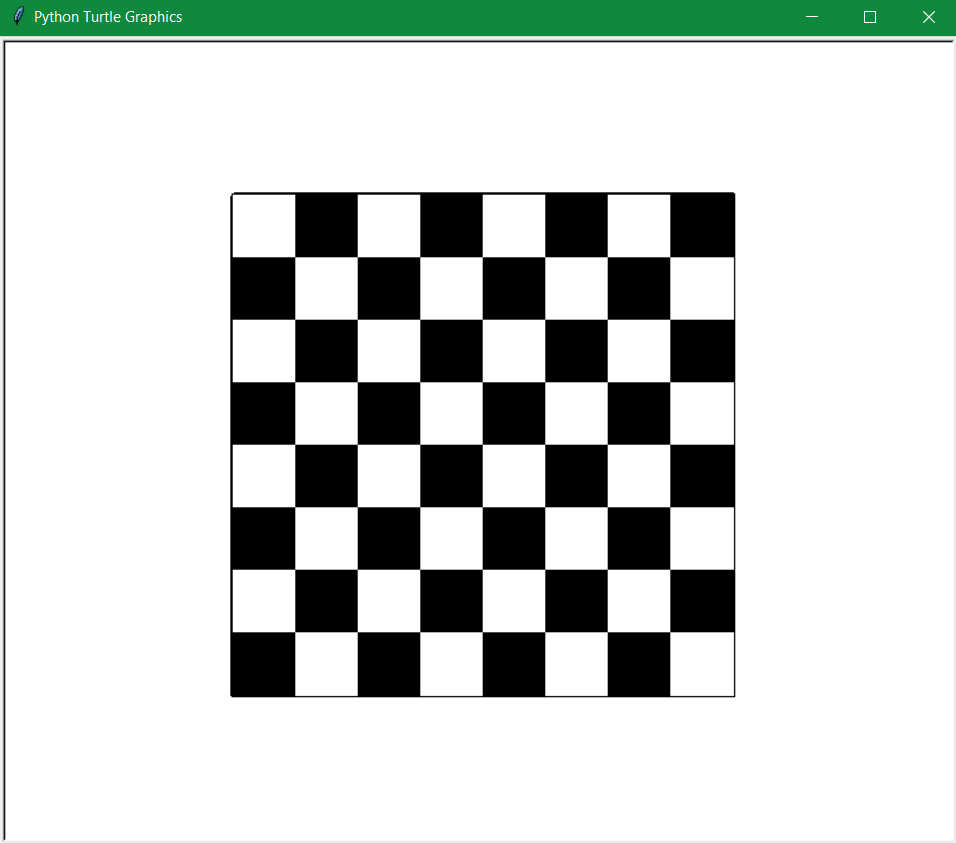
Turtle is a built-in module in Python that allows you to create graphics and animations using a virtual turtle that can move and draw on the screen. In this blog post, I will show you how to use turtle to draw a chessboard with black and white squares. A chessboard is a square board with 64 smaller squares arranged in an 8 by 8 grid. Each square has a color, either black or white, and the colors alternate along the rows and columns. Here is the final output of the code:
The Code
The code for drawing the chessboard is divided into three parts: importing the turtle module, defining some functions, and writing the main program. Let’s look at each part in detail.
Importing the turtle module
The first thing we need to do is import the turtle module and create a turtle object. We also hide the turtle so that it doesn’t show up on the screen. This is done by these lines of code:
import turtle
t = turtle. Turtle()
t.hideturtle()
Defining some functions
The next thing we need to do is define some functions that will help us draw the chessboard. We will define two functions: one for drawing a square of a selected color, and one for drawing a row of alternate colors (black and white).
Drawing a square
The function for drawing a square takes a size parameter and draws a square of that size using the turtle. We also fill the square with the current color of the turtle. The function is defined as follows:
# this function draws square of selcted color
def draw_square(size):
    t.down()
    t.begin_fill()
    for i in range(4):
        t.forward(size)
        t.right(90)
    t.end_fill()
    t.up()
The function works as follows:
- It lowers the turtle’s pen to start drawing (
t.down()). - It starts filling the shape with the current color (
t.begin_fill()). - It loops four times to draw each side of the square (
for i in range(4):). - It moves forward by the given size (
t.forward(size)). - It turns right by 90 degrees (
t.right(90)). - It ends by filling the shape with the current color (
t.end_fill()). - It raises the turtle’s pen to stop drawing (
t.up()).
Drawing a row
The function for drawing a row takes a size parameter and draws a row of eight squares of that size using the draw_square function. We also alternate the color of the turtle between black and white for each square. The function is defined as follows:
# this function draws row of alternate color (black and white)
def draw_row(size):
    for i in range(8):
        t.down()
        draw_square(size)
        t.up()
        t.forward(size)
        if t.color() == ("black","black"):
            t.color("white")
        else:
            t.color("black")
The function works as follows:
- It loops eight times to draw each square in the row (
for i in range(8):). - It lowers the turtle’s pen to start drawing (
t.down()). - It calls the draw_square function with the given size (
draw_square(size)). - It raises the turtle’s pen to stop drawing (
t.up()). - It moves forward by the given size to position itself for the next square (
t.forward(size)). - It checks the current color of the turtle and changes it to the opposite color (
if t.color() == ("black","black"):t.color("white")else:t.color("black")).
Writing the main program
The last thing we need to do is write the main program that uses these functions to draw the chessboard. We will do this by following these steps:
- Set up some variables for the size and position of the board.
- Set up some parameters for the speed and pensize of the turtle.
- Set up the initial color of the turtle.
- Draw a big square as the border of the board using the draw_square function.
- Loop to draw eight rows of squares using the draw_row function.
- Change the position and color of the turtle for each row.
The code for these steps is as follows:
# main program
t.up()
sizeip = 400 # set size for board
(x,y)=(-sizeip/2,sizeip/2)
t.setpos((x,y))
t.speed(50)
t.pensize(4)
t.color("black")
t.down()

draw_square(sizeip)
t.pensize(1)
# this loop take turtle to next column and change its color
for i in range(8):
    t.setpos((x,y))
    if t.color() == ("black","black"):
        t.color("white")
    else:
        t.color("black")
    draw_row(sizeip/8)
    y -= sizeip/8

turtle.done() # hold output on screen
The code works as follows:
- It raises the turtle’s pen to stop drawing (
t.up()). - It sets the size of the board to 400 pixels (
sizeip = 400). - It sets the initial position of the turtle to the top left corner of the board (
(x,y)=(-sizeip/2, sizeip/2)t.setpos((x,y))). - It sets the speed of the turtle to 50 (
t.speed(50)). - It sets the pensize of the turtle to 4 (
t.pensize(4)). - It sets the initial color of the turtle to black (
t.color("black")). - It lowers the turtle’s pen to start drawing (
t.down()). - It draws a big square as the border of the board using the draw_square function with the size of the board (
draw_square(sizeip)). - It sets the pensize of the turtle to 1 (
t.pensize(1)). - It loops eight times to draw each row of squares (
for i in range(8):). - It sets the position of the turtle to the top left corner of each row (
t.setpos((x,y))). - It checks the current color of the turtle and changes it to the opposite color (
if t.color() == ("black","black"):t.color("white")else:t.color("black")). - It draws a row of squares using the draw_row function with one eighth of the size of the board (
draw_row(sizeip/8)). - It decreases the y coordinate of the turtle by one eighth of the size of the board to move to the next row (
y -= sizeip/8). - It holds the output on screen until you close it (
turtle.done()).
Conclusion
In this blog post, I have shown you how to use turtle to draw a chessboard with black and white squares. I have explained each part of the code and how it works. I hope you enjoyed this tutorial and learned something new. You can also modify the code to change the size or color of the board or add some pieces on it. Have fun with turtle and python! 😊
 Nucleux Zero